Oolook for AI Marketing Copilot

Turn Marketing Objectives Into Reviewable Actions with AI

Use a workspace-aware Copilot that can inspect available brand information, prepare marketing content, and present supported actions for confirmation.

Oolook Copilot

Brand-aware content preparation

Working in: Alder & Form
Ask anything
Brand details shown here are fictional. Actual output uses available information from the selected Brand Kit.
Prepare a campaignReview publishing statusCreate follow-up content

Supported actions are prepared for review and confirmation. Publishing capabilities and formats depend on current Oolook availability and the destination network.

Workspace-aware marketing assistance

Start With Your Brand Workspace, Not an Empty AI Chat

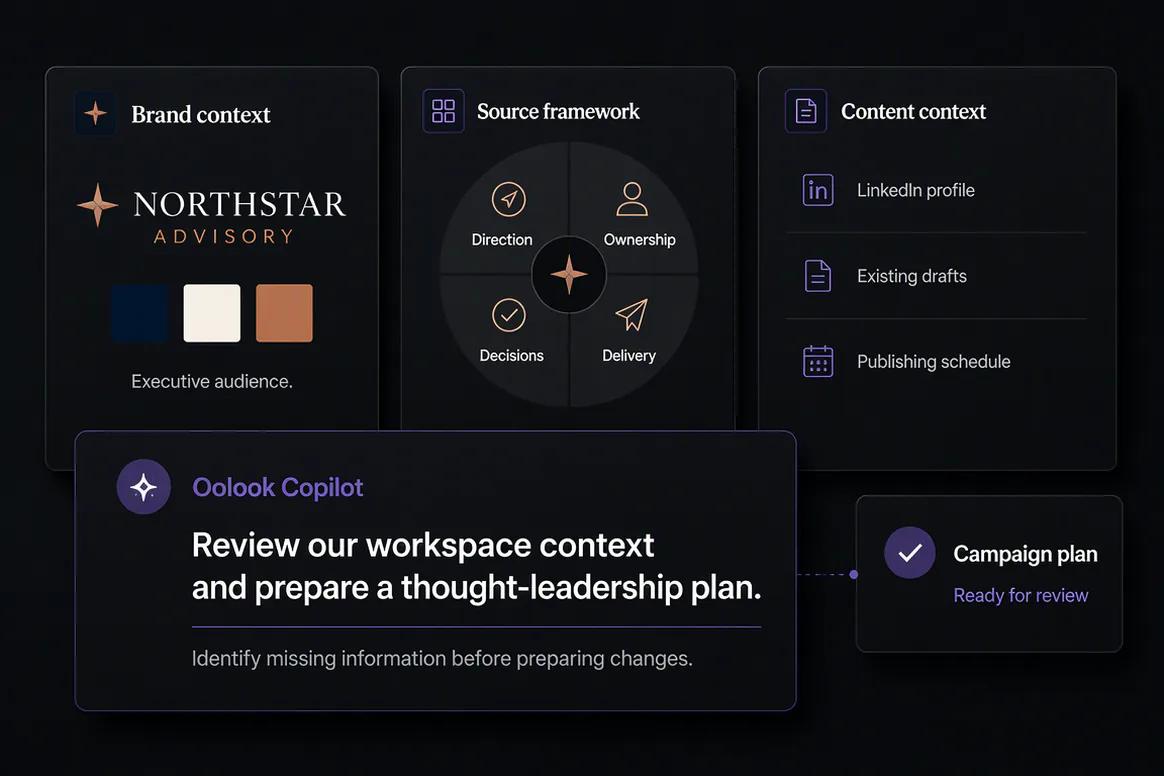
Oolook Copilot can work with available Brand Kit information, media, connected profiles, drafts, schedules, reports, SEO projects, and application history.

Inspect the workspace

Give Copilot the Context Already Stored in Oolook

Ask questions about the selected brand without manually copying every profile, draft, asset, report, and Brand Kit field into a separate conversation.

  • Inspect available Brand Kit information
  • Review connected profiles and publishing records
  • Find relevant Media Library assets
  • Work with available reports and content history
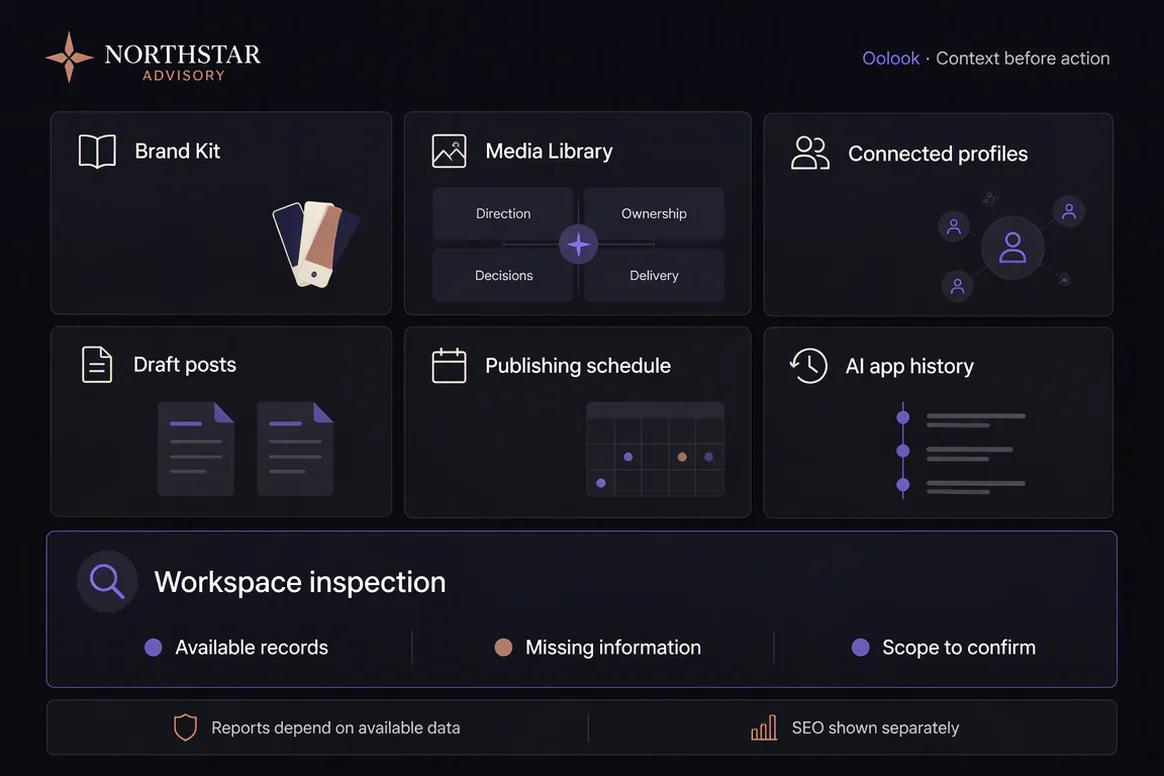
Oolook Copilot inspecting available information in a brand workspace

Prepare marketing content

Move From an Objective to Brand-Aware Drafts

Describe the campaign, audience, offer, and destinations. Copilot can help organize the objective and prepare content using supported workspace context.

  • Prepare captions and destination-specific variants
  • Connect drafts to available brand context
  • Find existing assets before generating new ones
  • Continue into supported image or carousel workflows
Oolook Copilot preparing brand-aware marketing content

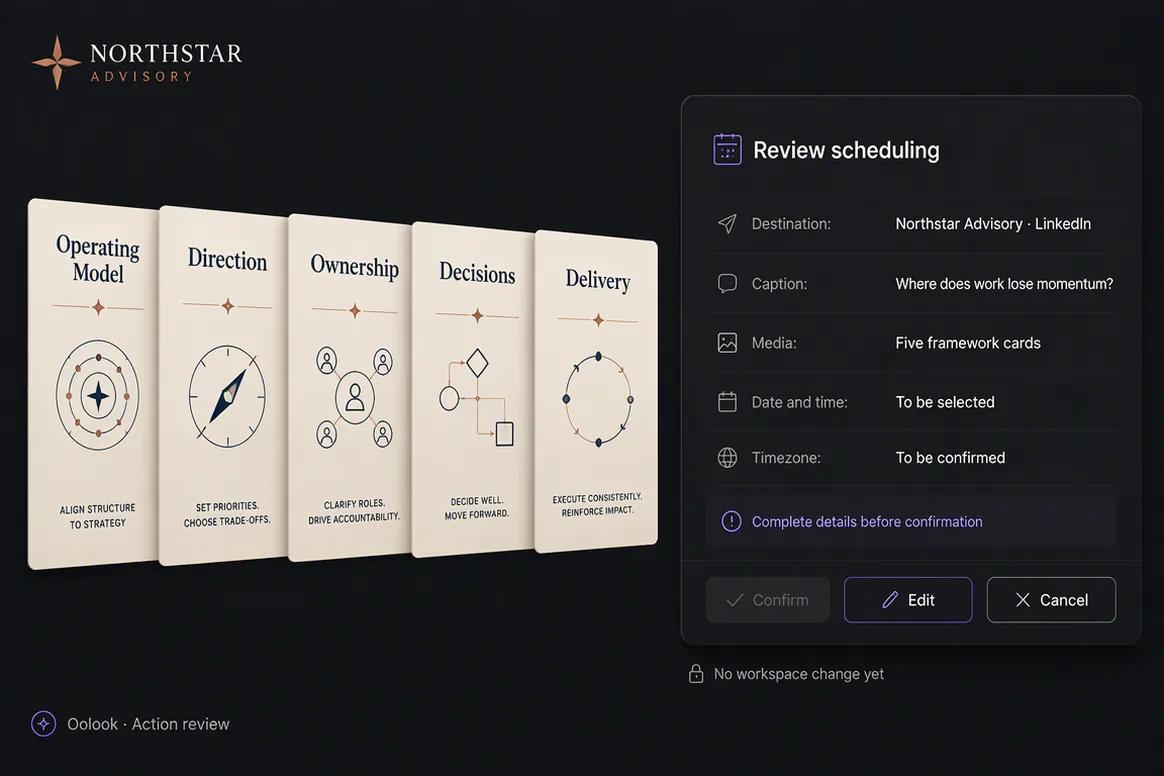
Review the proposed action

See What Will Change Before You Confirm It

Oolook separates assistance from execution. Supported workspace changes can be prepared for review so the user retains control.

  • Review the proposed content and destination
  • Inspect selected media and publishing details
  • Correct incomplete or inaccurate information
  • Confirm only the actions you want executed
Supported Oolook Copilot action displayed for confirmation

Continue through execution

Use Copilot Across Content, Publishing, Reports, and SEO

Continue from a question into supported marketing work without losing the connection to the selected brand workspace.

  • Prepare social drafts and publishing actions
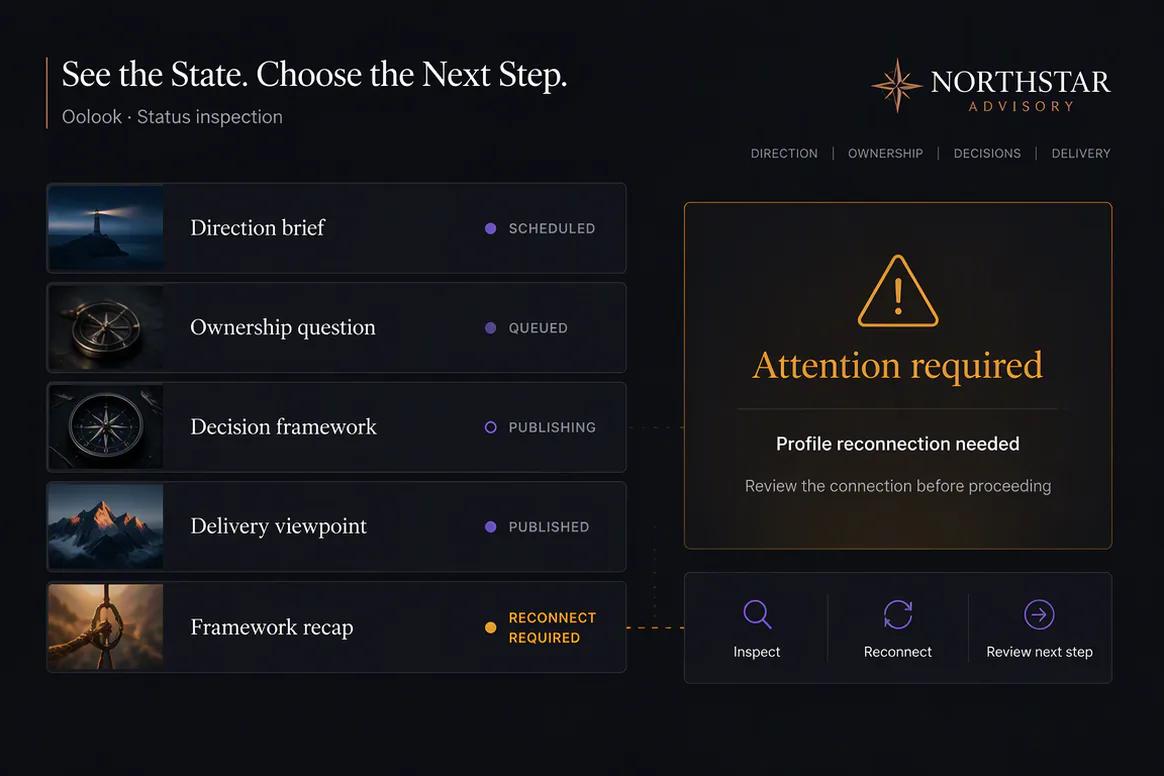
  • Inspect available publication statuses
  • Summarize accessible profile and post metrics
  • Continue into supported SEO content workflows
Oolook Copilot connecting content, publishing, reporting, and SEO workflows

Copilot campaign examples

See How Copilot Connects Context to Controlled Execution

Move from workspace inspection into content preparation, asset reuse, social execution, and SEO content while keeping supported actions reviewable.

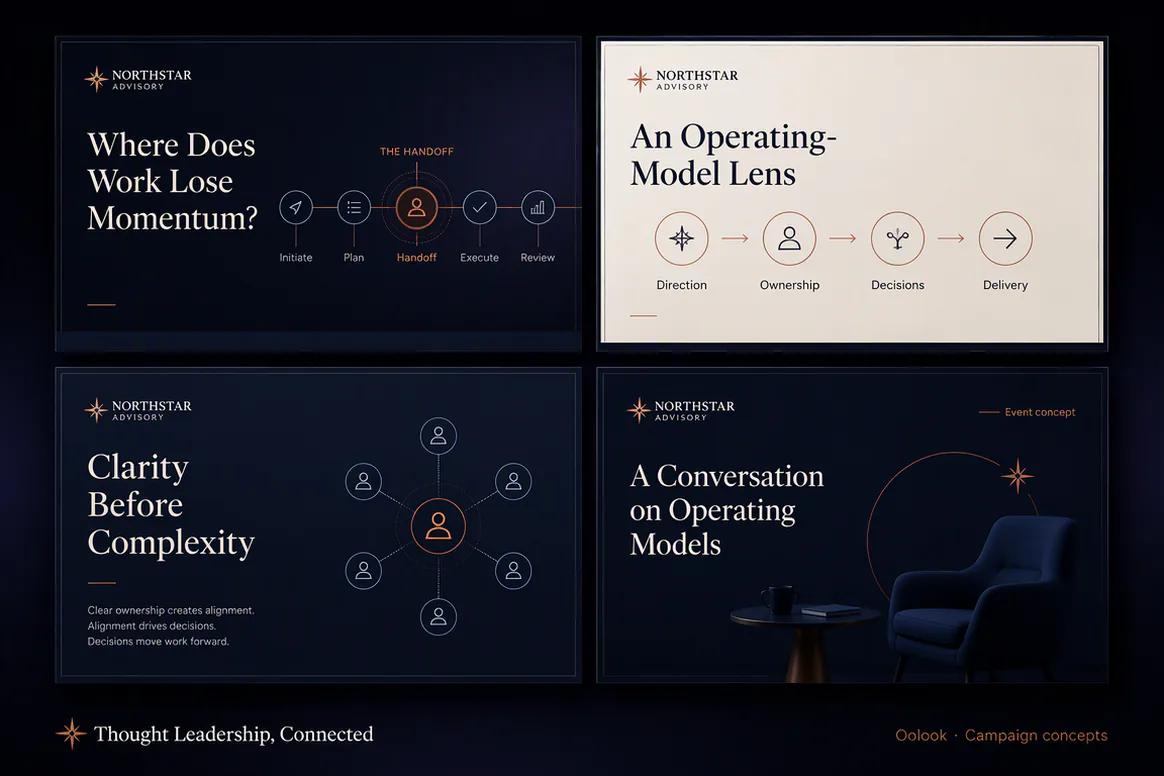
Oolook Copilot displaying a complete consulting thought leadership campaign

Campaign Prepared With Copilot

Turn an approved objective, Brand Kit, source framework, and workspace context into a coordinated campaign.

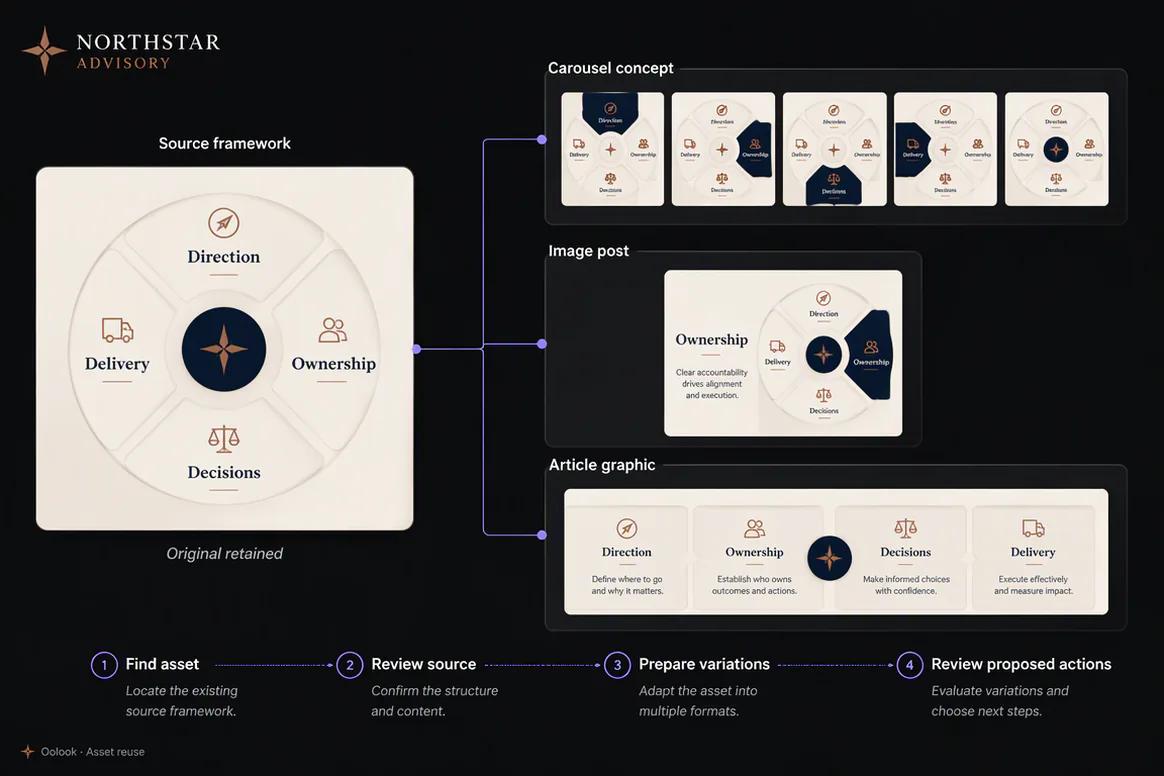
Oolook Copilot finding and reusing an approved framework asset

Copilot-Assisted Asset Reuse

Find approved Media Library assets, inspect their source, and prepare new campaign variations.

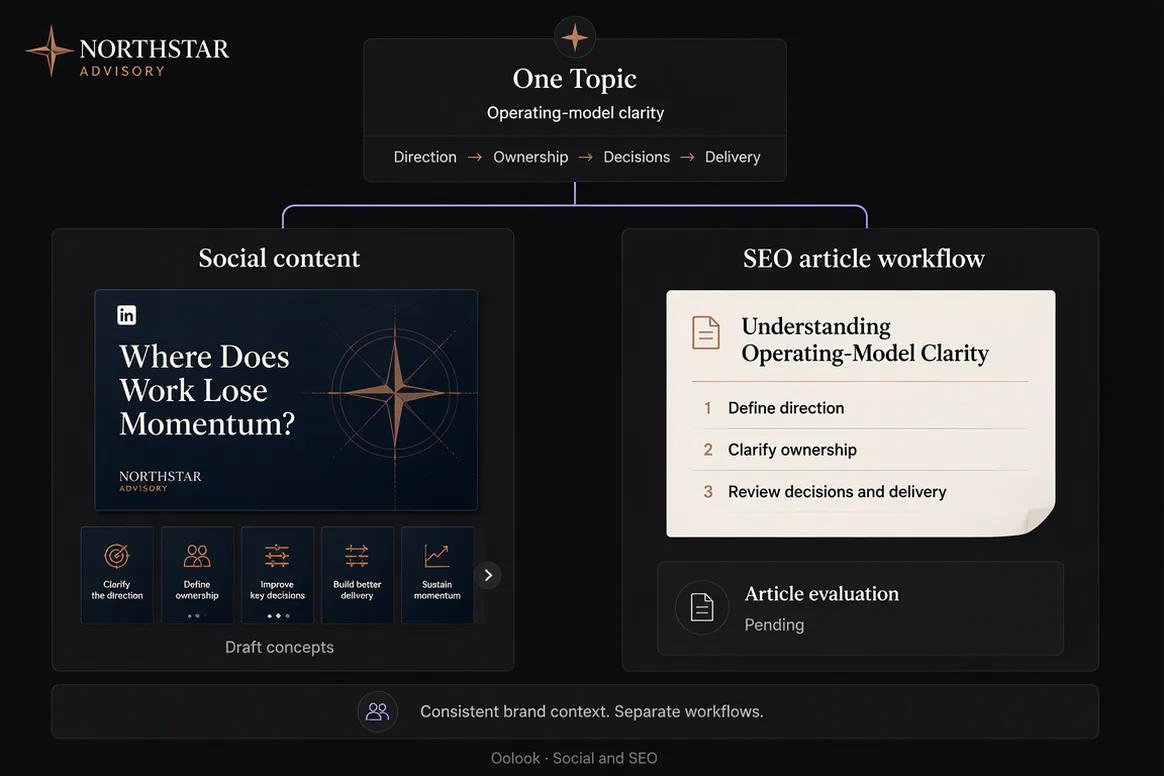
Oolook Copilot connecting social content and an SEO article workflow

Social and SEO Connection

Use the same approved topic and brand context across social drafts and evaluated article content.

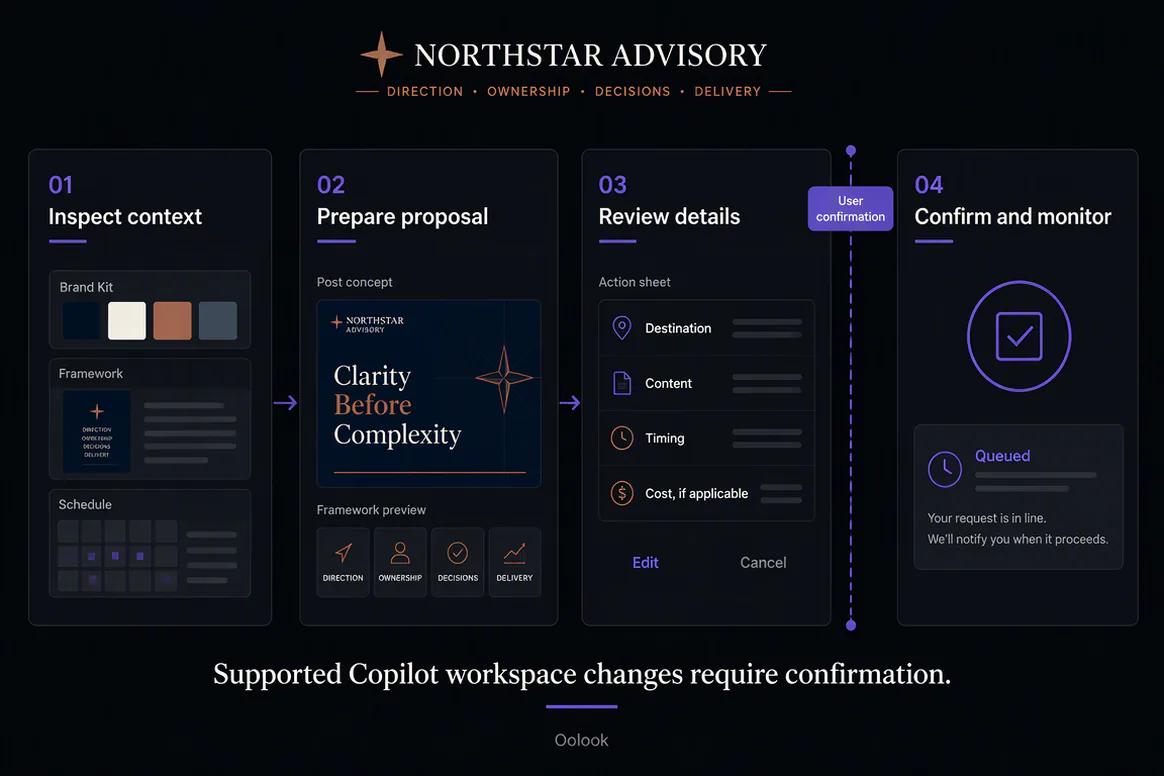
Oolook displaying a confirmation-based Copilot execution workflow

Confirmation-Based Execution

Inspect context, prepare the action, review every detail, and confirm only the intended workspace change.

Oolook Copilot in action

How Oolook Copilot Supports Marketing Execution

Move from a request to a transparent and controlled workspace action.

01

Ask in plain language

Describe the marketing objective, question, campaign, or workspace task.

02

Inspect available context

Copilot uses information it is permitted to access inside the selected brand workspace.

03

Prepare the response

Copilot answers the question, prepares content, or builds a supported action with visible details.

04

Review and confirm

The user inspects supported workspace changes before they are executed.

Built for AI Marketing Copilot

Use Copilot Across Connected Marketing Workflows

Available tools, actions, models, limits, and credit costs depend on the current Oolook product and selected plan.

Workspace questions

Ask about available brand information, media, profiles, drafts, schedules, reports, and activity.

Content preparation

Prepare captions, campaign drafts, content directions, and supported creative requests.

Publishing actions

Prepare supported scheduling and publishing actions with visible destination details.

Performance follow-up

Summarize available information and turn useful observations into the next content action.

Practical marketing jobs

Use Copilot for Practical Marketing Work

Copilot is designed to assist with real workspace tasks, not to promise unrestricted autonomous marketing.

Prepare a multi-platform campaign from a brief

Find relevant assets for an upcoming post

Review scheduled content for the next week

Identify publishing actions that need attention

Summarize available social performance information

Prepare follow-up content from an approved observation

One connected workspace

Copilot Works Across the Selected Brand Workspace

Its value comes from connecting assistance to the information and workflows already organized in Oolook.

Brand Kit context

Use available identity, audience, positioning, writing preferences, visual direction, and calls to action.

Media Library context

Find and reuse uploaded, generated, and processed assets associated with the selected brand.

Creative workflows

Continue into supported caption, image, carousel, moodboard, and media-processing applications.

Publishing context

Inspect available drafts, schedules, destination details, queue states, and publication records.

Reporting context

Review available profile and post information from supported connected networks.

Confirmation control

Inspect supported workspace mutations before allowing Copilot to execute them.

Why Oolook

Move Beyond an Isolated AI Conversation

Oolook Copilot is connected to the selected brand workspace and its supported marketing workflows.

Workflow
Disconnected tools
Oolook
Context
Rebuilt manually for every conversation
Drawn from available workspace information
Brand guidance
Entered as repeated prompt instructions
Connected to structured Brand Kit information
Media
Uploaded again for each request
Found and reused from the Media Library
Execution
Copied manually into another product
Prepared as a supported workspace action
Control
Changes may be unclear or outside the workflow
Supported mutations are shown for confirmation

Step-by-step guide

How to Use Oolook Copilot

Give Copilot a clear objective, review the context it uses, and retain control over execution.

  1. 1

    Select the correct brand workspace

    Copilot operates within the context and permissions of the selected brand.

  2. 2

    State the objective

    Explain what you want to understand, create, review, organize, or prepare.

  3. 3

    Provide required constraints

    Include the audience, offer, destinations, timing, factual requirements, and approved source material.

  4. 4

    Review Copilot's response

    Check the assumptions, source information, proposed content, and any unavailable details.

  5. 5

    Inspect proposed actions

    Review the exact records, fields, media, destinations, or dates involved in the supported action.

  6. 6

    Confirm the selected action

    Approve only the action that accurately represents the intended marketing work.

  7. 7

    Monitor the result

    Return to the relevant application, queue, report, or content record to verify the outcome.

Frequently asked questions

Your AI Marketing Copilot Questions, Answered

What is Oolook Copilot?+

Oolook Copilot is a workspace-aware assistant that can answer questions, inspect available workspace information, prepare marketing content, and present supported workspace actions for confirmation.

How is Copilot different from a general AI chatbot?+

Copilot can work with information available in the selected Oolook brand workspace, including Brand Kit context, media, connected profiles, drafts, schedules, reports, SEO projects, and application history.

Can Copilot create social media content?+

Yes. Copilot can prepare marketing content and connect users to supported caption, image, carousel, media, publishing, and SEO workflows.

Can Copilot schedule social posts?+

Copilot can prepare supported scheduling actions with destination, content, media, date, time, timezone, and relevant settings for review.

Does Copilot make changes without permission?+

Supported workspace changes are presented for confirmation before execution.

Can Copilot review performance?+

Copilot can work with available reporting information. Its responses should remain grounded in metrics Oolook can access and should identify unavailable data.

Does Copilot use AI credits?+

Oolook uses credits for supported AI operations. Exact credit costs and plan allowances depend on the current application, model, action, and pricing configuration.

Is Copilot fully autonomous?+

No. Oolook should not be presented as unrestricted autonomous marketing. It assists with workspace-aware preparation and performs supported actions after confirmation.

Start with Oolook

Give Your Marketing Assistant the Context of Your Workspace

Use Oolook Copilot to connect brand information, media, content, publishing, reports, and supported actions without giving up control.