Oolook for Social Media Analytics

Review Social Performance and Prepare the Next Content Action

Bring available profile and post metrics into the same brand workspace used for content creation, media, scheduling, and publishing.

Oolook Copilot

Social performance review

Working in: Alder & Form
Ask anything
Demonstration metrics are fictional. Actual reporting depends on the selected profile and available network data.
Review recent performanceCompare top postsPrepare follow-up content

Supported actions are prepared for review and confirmation. Publishing capabilities and formats depend on current Oolook availability and the destination network.

Connected social reporting

Use Available Social Data Without Inventing Conclusions

Review metrics supplied through supported connected networks, compare content performance, identify observable patterns, and continue into the next content workflow.

Review the reporting period

Inspect Available Profile and Post Metrics

Choose the brand, connected profile, and reporting period. Review the information currently available through the supported social-network connection.

  • Keep reporting associated with the correct brand
  • Review accessible profile-level information
  • Inspect available post-level metrics
  • Recognize when a metric or history is unavailable
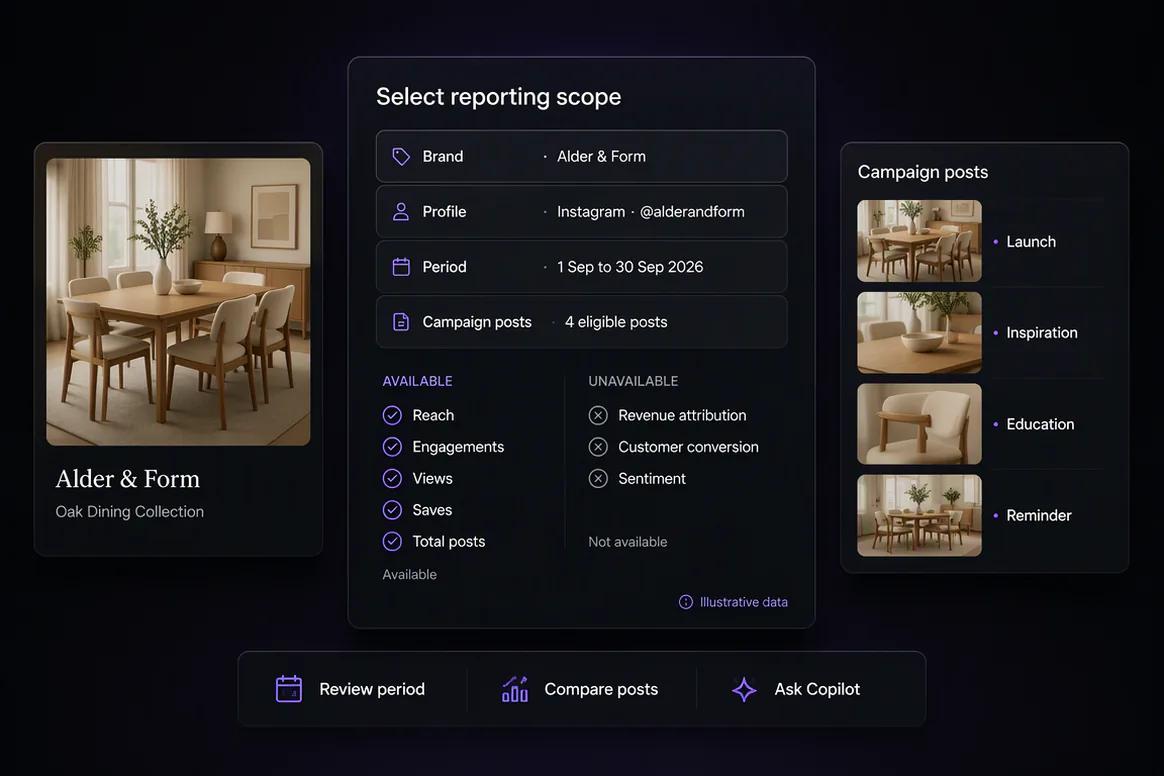
Available social profile and post metrics reviewed in Oolook

Compare content

Identify Observable Patterns Across Published Posts

Compare content using the metrics Oolook can access. Separate the pattern shown by the data from assumptions about why it occurred.

  • Compare eligible posts over a defined period
  • Review recurring topics, formats, or calls to action
  • Avoid claiming causation from limited social data
  • Keep network and reporting limitations visible
Oolook comparing available metrics across published social posts

Use Copilot

Turn a Useful Observation Into Follow-Up Content

Ask Copilot to summarize available performance information and prepare a new content action grounded in an approved observation.

  • Summarize available metrics in plain language
  • Identify patterns without inventing unavailable evidence
  • Apply the selected brand's voice and campaign context
  • Find a relevant existing asset where possible
Oolook Copilot preparing follow-up content from available social data

Continue the cycle

Publish the Follow-Up and Return to Reporting

Review and confirm the next supported publishing action. After publication and sufficient data collection, compare the available results.

  • Prepare a destination-specific follow-up draft
  • Review the complete supported action
  • Monitor publication status
  • Return to reporting after enough data is available
Follow-up social content moving from publication to reporting in Oolook

Social reporting examples

Turn Available Social Data Into a Grounded Next Action

Review accessible profile and post information, document observable patterns, preserve analytical limits, and prepare follow-up content.

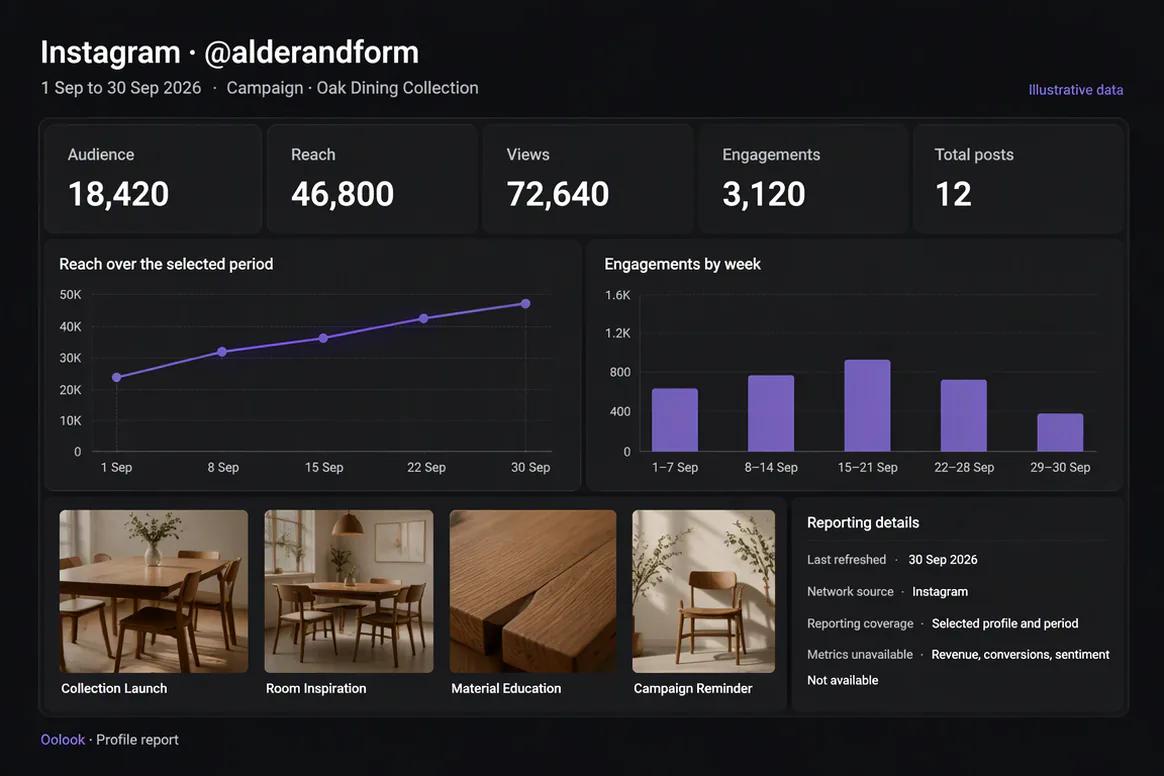
Oolook displaying an available social profile report

Profile Report

Review accessible account-level information, recent posts, reporting coverage, and unavailable metrics.

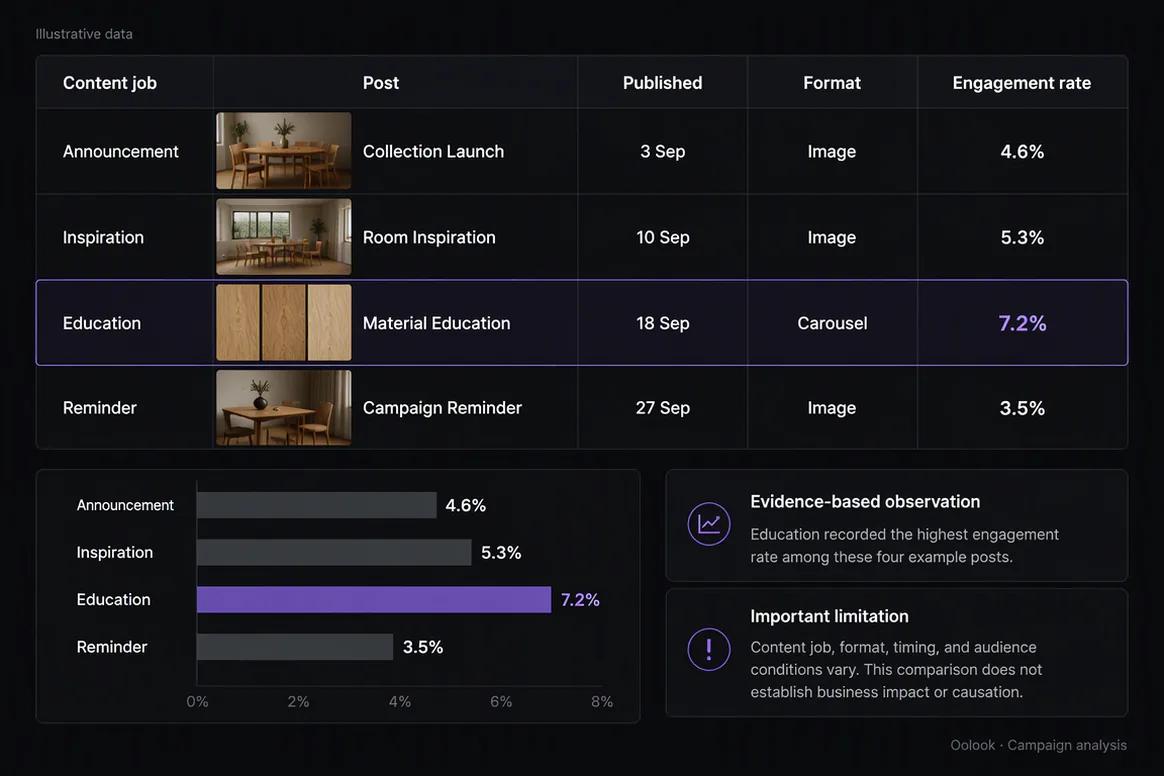
Oolook displaying a social campaign performance report

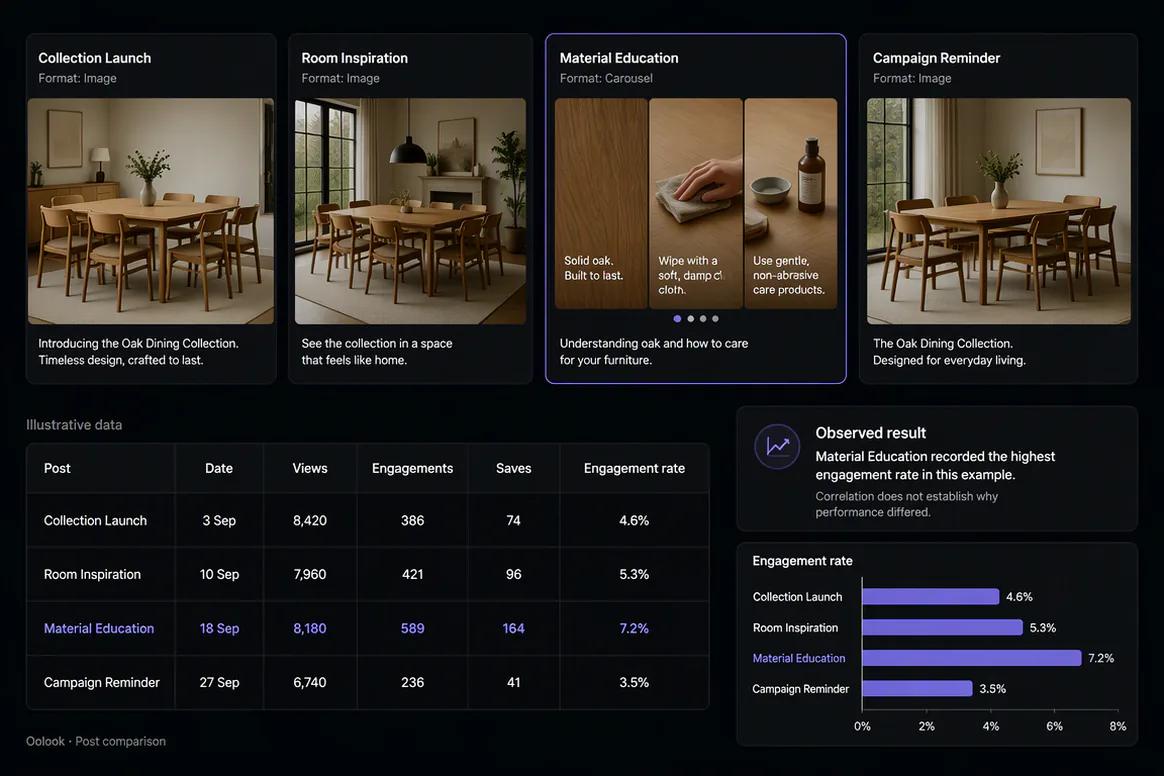
Campaign Report

Compare eligible campaign posts by destination, format, publishing date, and available metrics.

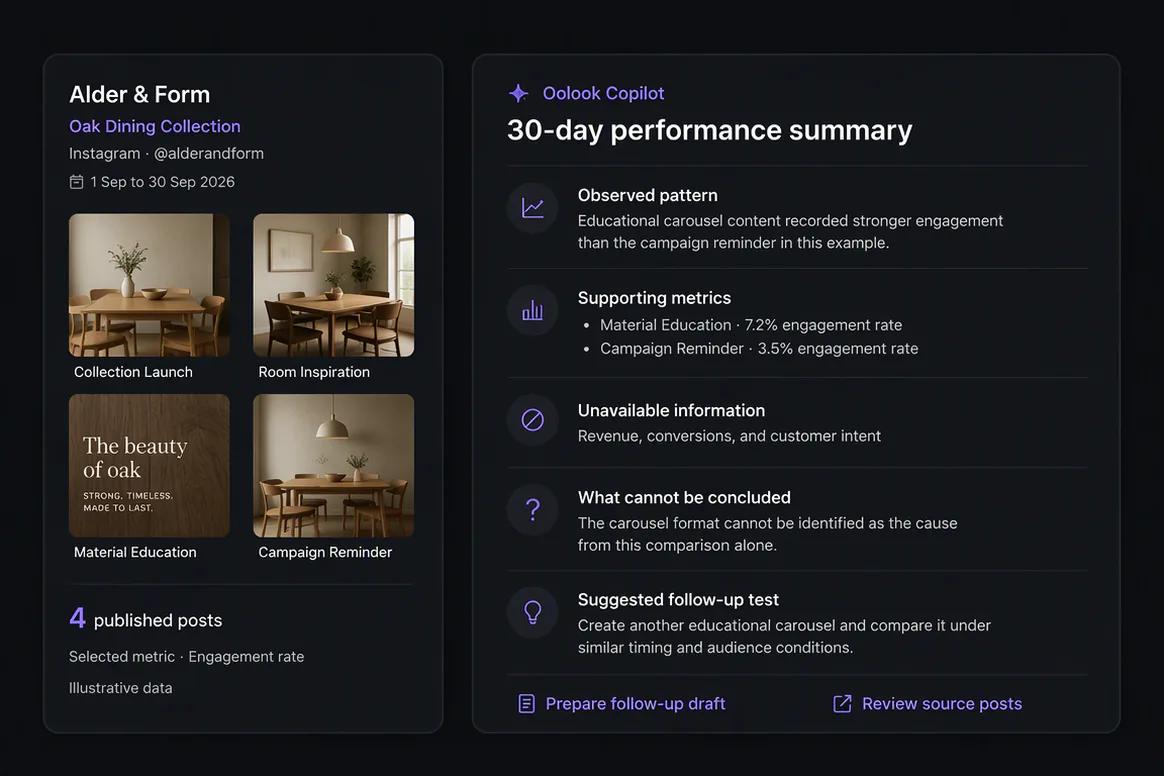
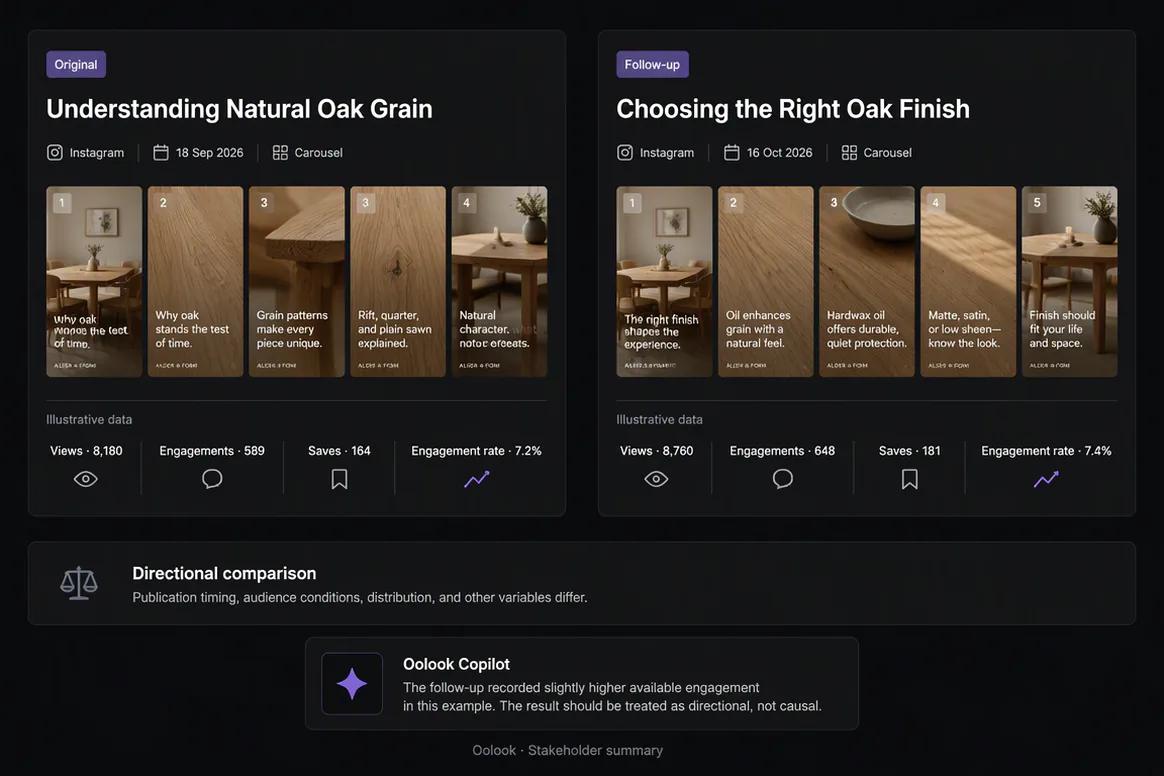
Oolook comparing an original social post with a follow-up post

Follow-Up Comparison

Compare related content while clearly identifying timing, audience, and data limitations.

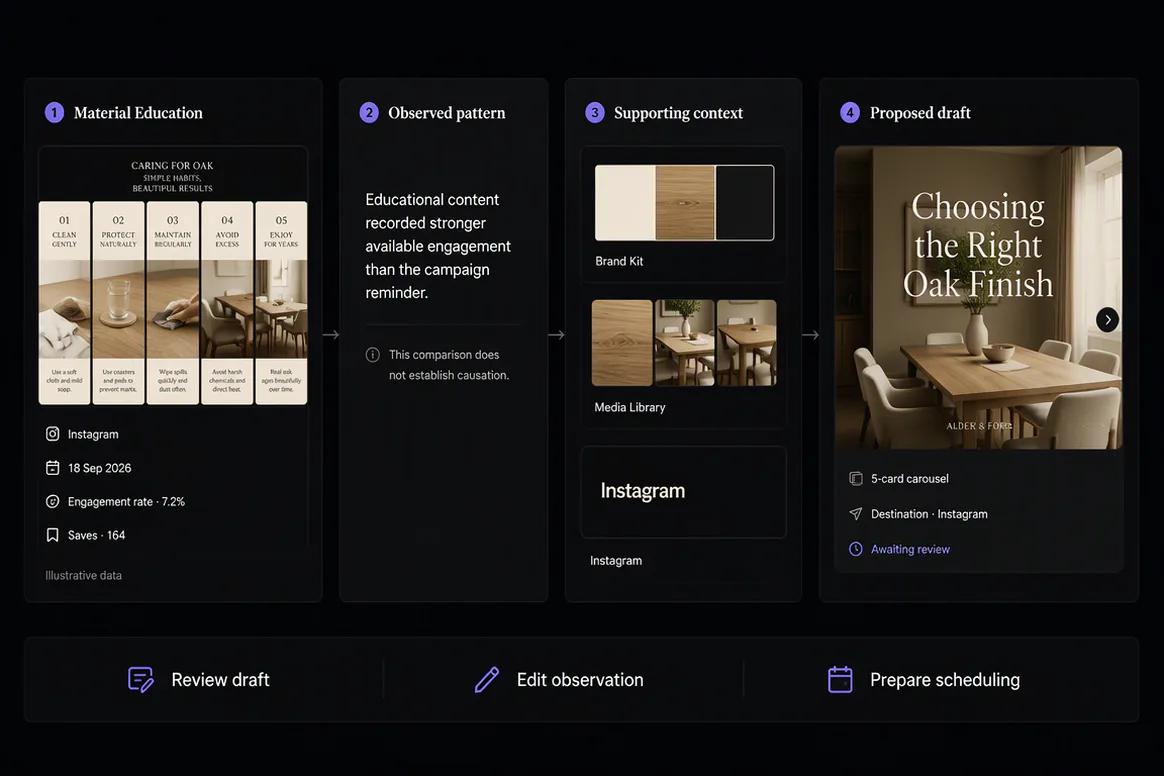
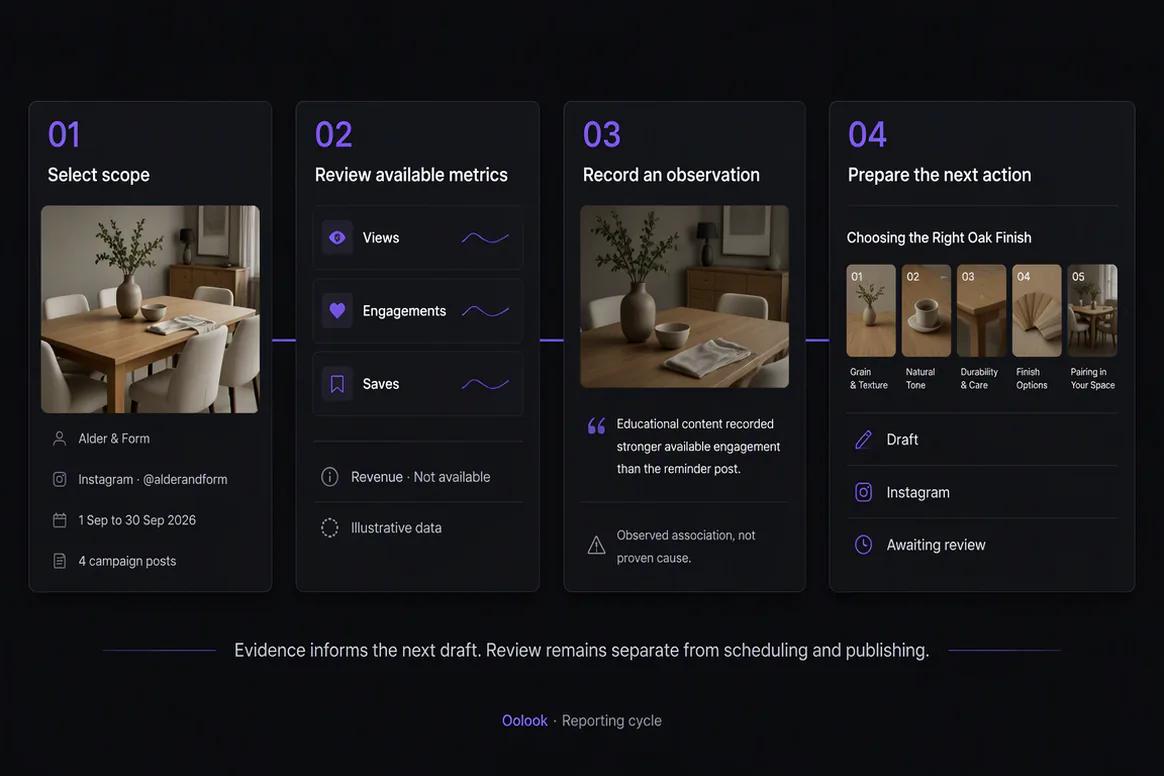
Oolook displaying the complete reporting and follow-up cycle

Reporting to Next Action

Connect reporting scope, evidence review, approved observations, and follow-up content preparation.

Oolook Copilot in action

How Oolook Turns Social Performance Into the Next Action

Use available evidence to inform content while preserving human review and analytical restraint.

01

Choose the reporting scope

Select the brand, connected profile, posts, and reporting period to review.

02

Inspect available metrics

Review the profile and post information Oolook can access from the supported network.

03

Identify a useful pattern

Compare content and separate observable evidence from unsupported explanations.

04

Prepare the next action

Use the approved observation to create and review follow-up content.

Built for Social Media Analytics

Review the Reporting Information Available to Oolook

Exact metrics, reporting history, refresh timing, and coverage depend on the connected network, account permissions, APIs, plan, and current Oolook availability.

Profile metrics

Review available account or profile information supplied through supported network connections.

Post metrics

Inspect available performance information for eligible published content.

Content comparisons

Compare posts over a defined period using metrics that are actually available.

Copilot summaries

Translate accessible reporting information into a clear review and next-step draft.

Practical marketing jobs

Use Oolook for Practical Performance Review

Keep analytics connected to content decisions without promising revenue attribution, viral prediction, or enterprise social listening.

Review a connected profile over a defined period

Compare eligible top-performing posts

Summarize available performance for a stakeholder

Identify content formats worth testing again

Prepare follow-up content from an approved pattern

Compare a follow-up post with the original

One connected workspace

Connect Reporting to the Rest of the Marketing Workflow

Performance review becomes more useful when the next content action can reuse the same brand context, media, drafts, and publishing workflow.

Profile and post reports

Review available information from supported connected social networks.

Copilot summaries

Ask questions about accessible data and prepare grounded follow-up actions.

Brand Kit

Apply the selected brand's audience, positioning, writing preferences, and visual direction to follow-up content.

Media Library

Find and reuse approved assets associated with earlier or related campaigns.

Creative applications

Create the caption, image, carousel, or media variation required for the next test.

Controlled publishing

Review, schedule, publish, and monitor the resulting content action.

Why Oolook

Connect Performance Review to Content Execution

Oolook keeps available reporting inside the same brand workspace used to prepare and publish the next action.

Workflow
Disconnected tools
Oolook
Brand scope
Reports and content stored in separate tools
Reports remain associated with the brand workspace
Data review
Metrics checked manually across profiles
Available profile and post information is connected
Interpretation
Observations copied into another AI conversation
Copilot can work with accessible reporting context
Creative follow-up
New content begins in separate applications
Continue into connected creative workflows
Execution
The next post moves into another scheduler
Prepare and confirm a supported publishing action

Step-by-step guide

How to Review Social Media Performance

Use a defined reporting scope and distinguish evidence from assumptions.

  1. 1

    Select the correct brand workspace

    Keep reports connected to the correct profiles, Brand Kit, content, media, and publishing history.

  2. 2

    Choose a connected profile

    Select an eligible destination with current authorization and accessible reporting information.

  3. 3

    Define the reporting period

    Choose a period that is long enough for a useful comparison and appropriate for the available history.

  4. 4

    Review available profile and post metrics

    Use only the information supplied through the current connected-network workflow.

  5. 5

    Compare relevant content

    Review posts with similar objectives and identify observable differences or recurring patterns.

  6. 6

    Prepare a follow-up action

    Ask Copilot to create a new draft based on an approved observation and the selected Brand Kit.

  7. 7

    Publish and evaluate

    Confirm the supported action, allow enough time for data collection, and return to the report.

Frequently asked questions

Your Social Media Analytics Questions, Answered

What is social media analytics software?+

Social media analytics software helps review available profile and post performance information from connected social networks.

What analytics does Oolook provide?+

Oolook provides available profile and post metrics from supported connected social networks. Exact metrics depend on each network, account, permissions, API, reporting history, plan, and Oolook availability.

Can Oolook compare social posts?+

Oolook can support comparison of eligible content using available post metrics. Comparisons should remain within the limits of the accessible data.

Can Copilot analyze social performance?+

Copilot can inspect available workspace reporting information, answer questions, summarize accessible metrics, and prepare supported follow-up actions.

Does Oolook track social media ROI?+

Revenue attribution should not be assumed as an established Oolook advantage. The documented scope is available profile and post metrics from supported connected networks.

Does Oolook provide social listening?+

Oolook reporting and search-content research should not be described as enterprise social listening or comprehensive real-time mention monitoring.

Can Oolook predict viral content or guaranteed growth?+

No. Oolook can help identify observable patterns in available data, but it should not promise virality, follower growth, engagement, leads, rankings, or revenue.

How much reporting history is available?+

Reporting history depends on the connected network, account permissions, available API data, current plan, and Oolook product availability.

Start with Oolook

Turn Available Social Performance Into the Next Content Action

Review accessible profile and post metrics, identify grounded patterns, and continue into brand-aware content and controlled publishing.